Are you a Mobile Legends gamer having the urge to experience the latest heroes, events, major changes, and items before everyone else? Look no further! In this guide, we’ll unravel the mysteries of the Mobile Legends advanced server and provide you with the keys to unlock the server.
The advanced server acts as a playground for upcoming Mobile Legends content. Gain an edge by trying out cutting-edge heroes, getting to know upcoming events, and testing the latest items, and game changes before their official release. But beware of drawbacks, like high ping and the inability to play with live server users – challenges that seasoned players gladly embrace for the thrill of exploring fresh content.
How To Access Advanced Server in Mobile Legends
There are 2 methods to access the advanced server in Mobile Legends
Automation Method

Every Thursday, Mobile Legends chooses the first 40,000 players who have met the needed requirements which are to reach level 15 and stable internet connection. So the way to get an advanced server through this method is:
- Be among the first 40,000 players to meet requirements.
- Ensure your account is at least level 15, and your internet connection is stable.
However, this method only depends upon luck whether you get to choose among 40,000 or not.
Chat GPT Method
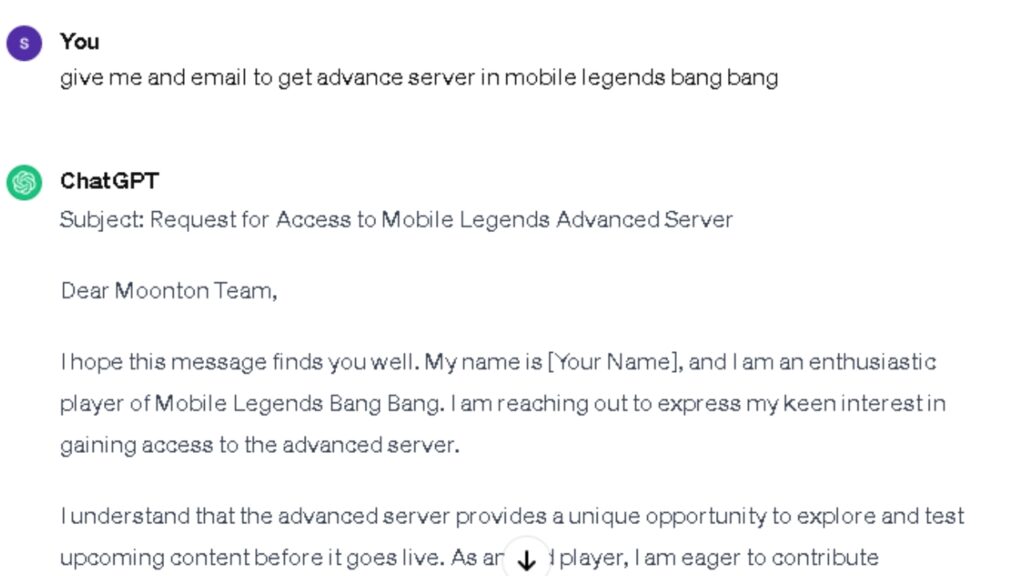
In this method, we will send an email to mobile legends using Chat GPT. Here is step by step guide
- Step 1: You need to have a very stable internet connection. You can check your internet power by going through: Mobile Legends Home > Settings > Network Test > Tap to test.
- Step 2: Go to Chat GPT
- Step 3: Give it a message to create an email draft for getting an advanced server in MLBB
- or copy this template

Subject: Request for Access to Mobile Legends Advanced Server
Dear Moonton Team,
I hope this message finds you well. My name is [Your Name], and I am an enthusiastic player of Mobile Legends Bang Bang. I am reaching out to express my keen interest in gaining access to the advanced server.
I understand that the advanced server provides a unique opportunity to explore and test upcoming content before it goes live. As an avid player, I am eager to contribute feedback and be part of the exciting process of trying out new heroes and features.
Below are the details of my Mobile Legends account:
- Mobile Legends In-Game Name: [Your In-Game Name]
- Account Level: [Your Account Level]
- Server: [Your Current Server]
- Stable Internet Connection: [Yes]
I meet the requirements and am confident in my ability to provide valuable insights during the testing phase. I am committed to upholding the standards of fair play and respectful engagement within the Mobile Legends community.
I would greatly appreciate it if you could consider my application for access to the advanced server. Thank you for your time and consideration.
Looking forward to the possibility of exploring the cutting-edge features of Mobile Legends on the advanced server.
Best regards,
[Your Full Name]
[Your Mobile Legends In-Game Name]
- Step 4: Go to your Gmail and click on compose
- Step 5: Write “[email protected]” in the “To” blank space and the subject line in the subject space
- Step 5: Paste the copied template inside the body and fill in the required information
- Step 6: Wait for mobile Legends’ response to check if they will give you access to an advanced server or not.
Tap Tap Method
In this method, you either download the mobile legend bang bang beta through the link you get from the in-game inbox or manually from the tap-tap application.
In-Game Method

In this method, you may get a message like the above by which you can click the link and get access to the advanced server by downloading mobile legends Bang Bang beta
Manual Method

Step 1: Download the tap tap app through Google and install it.
Step 2: Sign up for your account.
Step 3: Search “Mobile Legends Bang Bang Beta”
Step 4: Download it. If you didn’t see the download come back again another Thursday.
Embarking on Your Advanced Server Journey: A Simple Setup Guide
- Follow the steps provided to be among the first to experience new content.
- Download the game client for a smooth entry into the advanced server.
- Understand that seasoned players are already familiar with new content.
- Learn techniques to avoid falling victim to more experienced opponents.
Conclusion
Accessing the Mobile Legends advanced server is now within your reach! Stay ahead of the curve, immerse yourself in exclusive content, and embark on a thrilling journey into the future of Mobile Legends. Ready, set, go!